RadarModel Now Runs as a GitHub Action That Comments on Model Drift
A drift report nobody reads doesn’t help. RadarModel always worked in CI, but you had to write the job, keep the snapshots between runs yourself and dig the output out of a log. RadarModel 0.5 is a GitHub Action: one step that checks your AI models or your database schema, writes the report where the team already looks, and fails the job when something you depend on breaks. It’s open source under the Apache License 2.0, and the code is on GitHub.
- uses: radarmodel/[email protected]
  with:
    scan: true
  env:
    OPENAI_API_KEY: ${{ secrets.OPENAI_API_KEY }}
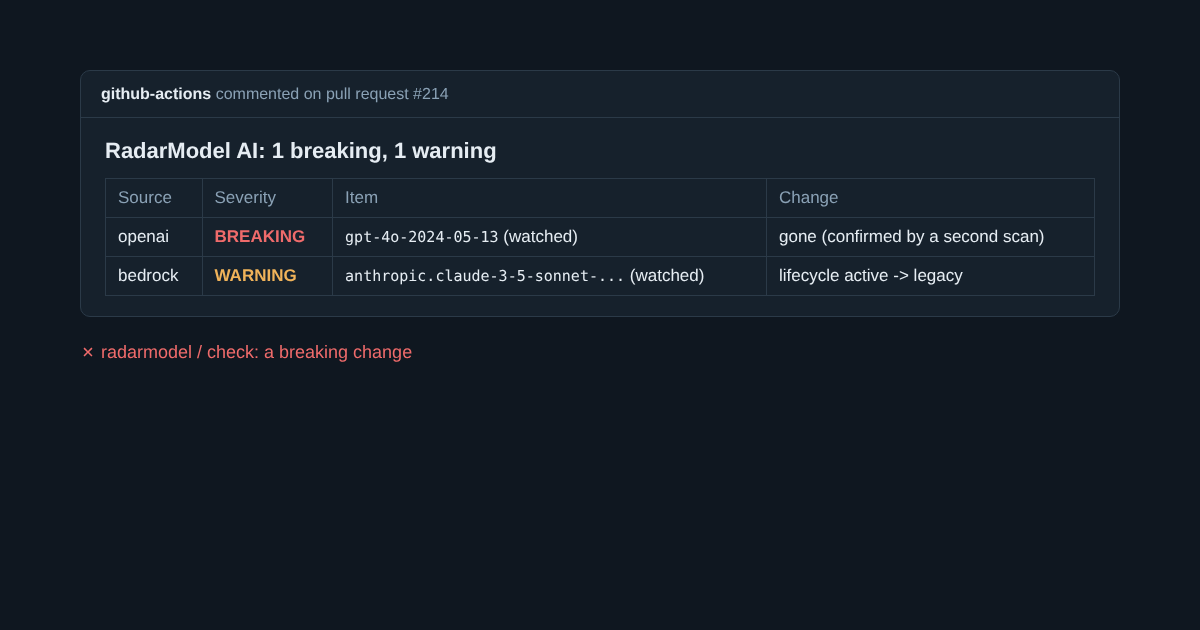
The comment the team sees, and the check that stops the merge.
Where the report goes
- On a pull request, one comment that’s updated on every run, so it never shows drift that has since been fixed. It’s only created when there’s something to report.
- On a schedule, an issue titled “RadarModel: model drift”, opened the first time something needs attention and commented on when the report changes. A provider that’s down every morning doesn’t add a comment every morning.
- Always, the job summary, and the job fails on a breaking change unless you set
fail: false.
With scan: true it also runs the code scan, so a pull request that starts calling a model nobody watches fails before it merges. Set product: schema and it does the same for database drift.
Built to be left alone
The snapshots stay in the Actions cache between runs, keyed by the config’s path, so editing the watch list doesn’t throw away what RadarModel already knows. The action downloads the release it’s pinned to and checks it against the published checksums before running it.
Model names and column names come from outside your repository, so the report escapes them: a name can’t break the table or mention anyone. The action only ever edits comments it wrote itself. A pull request from a fork has a read-only token, so the report stays in the job summary and the step warns instead of failing the build.
Two independent reviews went through the action before release and found fifteen problems, from comment hijacking to cache keys that reset on every config edit. Running its own tests on Windows turned up one more: a long report was too big for a Windows command line. All are fixed, each with a test.
See the quick start for a full workflow and the reference for every setting.